Pro-grade photo editing, powered by AI — and it stays on your phone.
Lumea pairs a precise, hands-on editor with a full AI studio — erase distractions, restore faded shots, swap skies and expand past the frame. For anyone who wants their photos to look edited on purpose.
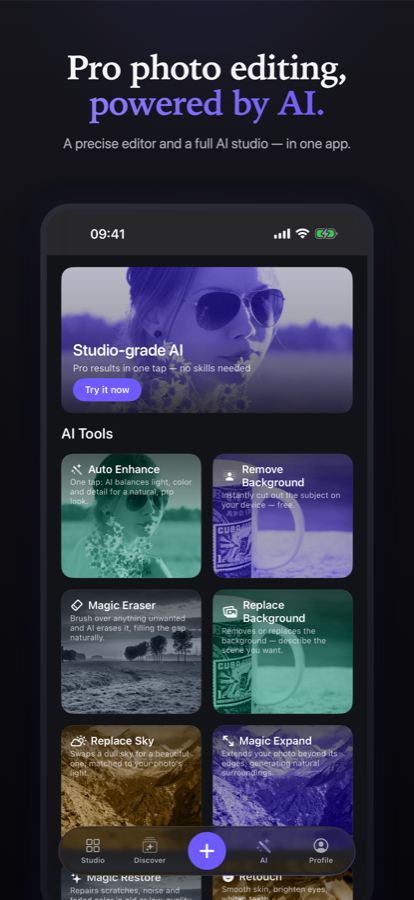
Everything a good photo needs.
Ten pro tools — Crop, Adjust, Filters, Curves, Text, Frames, Cutout, Overlays, Masking and Retouch — plus an AI studio for the parts nobody enjoys doing by hand.
Magic Eraser
Brush over a distraction — a stranger, a wire, a stray sign — and AI fills the gap so naturally you would never know it was there.
Restore & enhance
Revive faded colour, clear up noise and pull detail back out of old or dull shots, in a single tap.
Replace the sky or background
Swap a flat sky or a busy scene for one that fits, matched to the light already in your photo.
Magic Expand
Uncrop past the edges. AI paints in what was just outside the frame, so nothing has to be cut to fit.
Filters and one-tap looks
Handcrafted filters previewed live on your own photo, plus Compositions tuned for portraits, landscapes, product and food.
Curves and selective masking
Shape tone channel by channel, then land it exactly where you want with AI subject, radial and linear masks.
Natural retouch
Smooth skin, brighten eyes, whiten teeth and fix red-eye — subtle by default, so people still look like themselves.
Private by design
Your photos are edited on your device and never uploaded, except the single moment you ask AI for help. No account needed.
See the difference before you commit.
Your best photo is already in your camera roll.
Download Lumea and bring it out in a tap. Free to start on iPhone and Android.